
Sales teams are great at writing notes. They capture budget hints, timelines, product needs, and decision-maker details in a few quick lines after every call. The problem? All of that valuable context often sits inside a free-text box.
If you want to turn CRM notes into structured lead data in Odoo, that information must live in fields the system can read. Otherwise, inside Odoo CRM, those insights remain invisible to reports, filters, reminders, and CRM data automation.
Most growing businesses don’t have a data problem. They have a CRM data structuring problem.
This is a common case of unstructured CRM data. While the information exists, Odoo cannot use it for CRM data automation, reporting, or Odoo lead management because it is stored as text instead of structured fields.
What does it mean to turn CRM notes into structured lead data in Odoo?
Structured lead data means saving information in dedicated fields rather than writing it as plain text.
Here’s a quick example of how CRM notes should map to Odoo fields:
What sales writes in notes | Where it should go in Odoo |
“Budget around 25k” | Budget field |
“Decision expected next month” | Expected closing date |
“Came from website form” | Lead source |
“Needs integration with existing ERP” | Requirements / custom field |
“Spoke to operations head” | Contact role / decision maker |
When this data lives in fields, Odoo can:
- Filter and segment leads
- Trigger follow-ups
- Score opportunities
- Forecast revenue accurately
- Power CRM data automation
When it stays in notes, it becomes unstructured CRM data that the system cannot use.
Why businesses need structured CRM data (and don’t realize it)
Teams usually discover this issue when they ask questions like:
- “How many leads have a budget above X?”
- “Which leads are closing this month?”
- “Which industry converts best?”
- “Which source brings the highest quality opportunities?”
At BizzAppDev, we see that over half of useful lead intelligence often sits inside notes instead of fields.
This leads to:
- Manual reading of notes before follow-ups
- Weak lead prioritization
- Poor forecasting
- Missed automation
- Dependence on salesperson memory
The CRM becomes a storage tool instead of a decision tool.
Why this problem starts during Odoo implementation
During many Odoo implementation projects, the focus stays on modules and screens, not on how sales conversations should translate into CRM data structuring.
Salespeople choose the fastest path: writing everything in notes.
“We’ll structure it later.”
Later never comes.
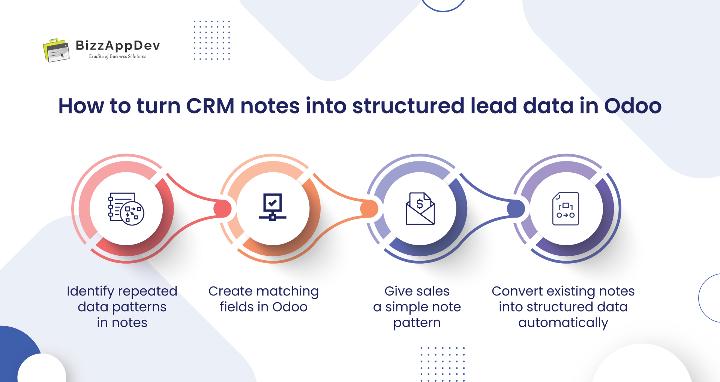
How to turn CRM notes into structured lead data in Odoo (step-by-step)
This can be fixed without forcing sales teams to change how they work.
Step 1 – Identify repeated data patterns in notes
Review recent leads. You will notice repeated mentions of:
- Budget
- Timeline
- Requirements
- Lead source
- Decision makers
These patterns tell you which fields are missing or unused.
Step 2 – Create matching fields in Odoo
Add or expose fields that match real conversations:
- Budget range
- Decision timeline
- Required solution
- Industry / use case
- Lead source detail
Now Odoo lead management is ready for structured input.
Step 3 – Give sales a simple note pattern
Instead of long paragraphs, guide them:
Budget:
Timeline:
Requirement:
Decision Maker:
They still write notes, but now in a predictable format.
Step 4 – Convert existing notes into structured data automatically
You don’t manually copy data from old notes.
You automate lead data extraction.
This is done using an LLM connected to Odoo
This is not a standard Odoo feature.
We connect a Large Language Model (LLM) with Odoo to read CRM notes and extract key information into the correct fields.
The LLM understands phrases like:
- “They can spend up to 30k”
- “Decision likely in Q2”
- “Referred by partner”
- “Needs integration with accounting system”
And maps them to:
- Budget
- Closing date
- Lead source
- Requirements
This enables sales note automation and converts years of unstructured CRM data into usable intelligence.
Benefits of turning CRM notes into structured lead data
Before:
- Reports are unreliable
- Managers read notes manually
- Follow-ups depend on memory
- Lead scoring is guesswork
After:
- Leads are filterable by budget, timeline, need
- Automated reminders become accurate
- Reports reflect real pipeline health
- Sales prioritization improves instantly
At BizzAppDev, we see that this change often delivers more value than adding new CRM features.
Common mistakes businesses make with CRM notes in Odoo
- Allowing sales teams to rely only on notes
- Not creating fields that match real conversations
- Ignoring historical data stored in notes
- Expecting reports to work without structured inputs
- Assuming this is a training issue, not a system design issue
These mistakes make CRM data harder to fix as the database grows.
Risks of keeping CRM data inside notes
- Reporting becomes harder as leads grow
- Marketing attribution stays unclear
- Automation opportunities are lost
- Knowledge stays with individuals
- Data cleanup becomes painful later
Checklist: Are your CRM notes hiding critical data?
You likely need this approach if:
- Sales notes are longer than filled fields
- Reports require manual review
- Budget and timeline are rarely populated
- Lead source tracking is inconsistent
- Forecasting feels unreliable
If you tick three or more, the issue is structural.
A smarter way to use Odoo CRM
Odoo becomes powerful when it receives structured inputs instead of unstructured CRM data.
By learning how to turn CRM notes into structured lead data in Odoo, businesses unlock better decisions, cleaner reports, reliable forecasting, and meaningful CRM data automation.
At BizzAppDev, we see that this shift often delivers more operational value than adding new modules
Final thoughts
If your team writes detailed notes but your CRM still feels incomplete, the issue is not effort. It’s structure.
When you turn CRM notes into structured lead data in Odoo, everyday sales conversations become actionable CRM intelligence, without extra work for your team.
Wondering how much valuable lead data is hiding inside your CRM Notes?
We can review your current Odoo setup and show you exactly what information can be converted into structured fields, reports, and automations, without changing how your sales team works.
FAQs
Not by default. This requires connecting an LLM that can understand natural language and map it to fields.
Very little. They continue writing notes, but in a guided format.
Yes. Historical notes can be processed and converted into structured data.
This is not a standard feature. It requires connecting an LLM with Odoo.
It improves them by enabling accurate automation and reporting.