Imagine asking an AI assistant connected to your ERP for your top five customers by revenue. The same company appears twice: once as “Acme Traders Pvt Ltd” and again as “Acme Traders.”
If the integration treats these as separate customers, it can split the company's revenue between two entries and distort the ranking. The problem starts in the source data, not necessarily in the AI model.
Preparing ERP data for AI means checking that the records and documents an AI application depends on are sufficiently complete, accurate, consistent and current for its intended use, and that access is properly controlled. The following eight areas help identify problems before integration begins.
Why ERP Data Quality Matters for AI
An employee reviewing an ERP report may notice an unusual figure and investigate. An AI assistant may present an answer without making the underlying data problem obvious.
For example, an inventory question can produce a misleading answer if the system's on-hand quantity is confused with its forecasted quantity.
AI needs the right records and business definitions to answer such questions correctly. Poor data quality is one of the issues businesses need to address during AI implementation in Odoo.
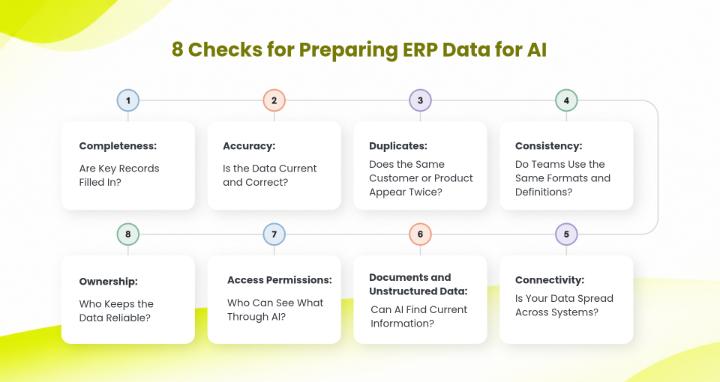
8 Checks for Preparing ERP Data for AI
1. Completeness: Are Key Records Filled In?
Look at whether the fields needed for the first use case contain usable information. Missing values can lead to incomplete answers.
In Odoo, this may include product categories, units of measure, contact details or other fields used by the workflow. A missing product cost matters for a cost-related question, but may not matter for an inventory lookup.
What to fix: Identify the fields the application needs and fill in missing or unusable values.
2. Accuracy: Is the Data Current and Correct?
Review outdated prices, inactive supplier records that are still linked to open transactions, and customer details that no longer match verified information.
In Odoo, look at the relevant pricelists, supplier information, product records and transaction statuses.
What to fix: Compare important records with trusted business sources and correct inaccurate values.
3. Duplicates: Does the Same Customer or Product Appear Twice?
Duplicate records can split transaction history, inflate counts and affect AI-generated summaries.
In Odoo, the same customer or company may appear under slightly different contact names. Product duplicates need a separate review; the Contacts merge tool does not resolve duplicate products.
Review suggested contact matches before merging. Odoo warns that merging contacts is irreversible, so confirm each match rather than assuming the suggestions are correct.
What to fix: Identify likely duplicates, confirm they represent the same entity and review linked data before merging or correcting.
4. Consistency: Do Teams Use the Same Formats and Definitions?
Teams need to record and describe business information in the same way. This includes units, dates, currencies and the meaning of business terms.
For example, a quantity of 12 could mean 12 pieces or 12 boxes if units are inconsistent. Someone reading the stock screen can see the unit. An AI answer that leaves it out could mislead a buyer.
In Odoo, review units of measure, product names, currencies and custom fields used across teams.
What to fix: Agree on shared formats and business definitions, then apply them to the records used by the application.
5. Connectivity: Is Your Data Spread Across Systems?
AI may need information from Odoo and other applications, such as a CRM, eCommerce platform or warehouse system.
Look at whether the systems share data, how often updates happen and which system is the main source when values differ. Spreadsheet exports can be useful, but teams should compare them with the source system before relying on them.
How current the data must be depends on the use case. A stock assistant may need up-to-date quantities, while an analysis of past sales may work with scheduled updates.
Connecting AI to an ERP, or integrating Odoo with other applications, needs clear data sources, reliable updates and a way to resolve conflicting values. AI integration with existing ERP systems and Odoo integration services cover the technical side.
What to fix: List the data sources the application needs, identify the main source for each and confirm how updates are shared.
6. Documents and Unstructured Data: Can AI Find Current Information?
Preparing unstructured data for AI means making sure the documents are current, readable and easy to find.
Business information may sit in Odoo attachments, shared drives, emails or PDFs. The application needs to find the approved version and read its contents. Scanned files may need OCR to make their text searchable, but the extracted text should still be checked for errors.
For Odoo document workflows, review where files are stored, who can access them and which version is approved. Available features depend on the Odoo edition and setup.
BizzAppDev's Odoo AI Knowledge Assistant demonstrates how business knowledge can be used within an ERP workflow.
Where the application supports source references, users should be able to see which document, and which version, informed an answer.
What to fix: Exclude superseded documents from the active retrieval collection, while retaining historical versions where required. Confirm that approved files can be read and searched.
7. Access Permissions: Who Can See What Through AI?
Odoo applies access controls to the user account the integration uses. If the application connects through a shared service account, its permissions may differ from those of the employee asking the question.
The integration must make sure employees only retrieve ERP records and documents they are allowed to access.
Review Odoo access rights, record rules and multi-company boundaries. Test the application with different user roles to confirm that it only returns records those users are allowed to see.
What to fix: Make sure the integration applies the right access permissions to ERP and document retrieval, then test it with different roles before launch.
8. Ownership: Who Keeps the Data Reliable?
Data quality needs clear ownership. Without it, duplicate records, old information and inconsistent entry habits can return.
Assign responsibility for the data areas used by the application. For example, decide who approves new product records, reviews supplier details and updates business documents.
What to fix: Name an owner for each relevant data area and agree on when records should be reviewed.
ERP Data Readiness Scorecard
Use this scorecard to assess whether the data needed for your first AI use case is ready. For any area that needs review or fixing, assign an owner and record the next action.
Area | Ready | Needs review | Needs fixing | Owner | Next action |
Completeness | Required information is available | Some information is missing | Critical fields are missing |
|
|
Accuracy | Important values are verified | Some values may be outdated | Important values are known to be incorrect or outdated |
|
|
Duplicates | No unresolved duplicates affect the use case | Possible duplicates need review | Confirmed duplicates affect results |
|
|
Consistency | Teams use common formats and definitions | Some differences remain | Conflicting formats or definitions affect results |
|
|
Connectivity | Required systems share current data | Some updates are delayed | Important data sources are unavailable |
|
|
Documents | Approved documents are readable and accessible | Some documents need review | Required documents are missing or unreadable |
|
|
Permissions | Access has been tested for relevant users | Some access scenarios remain untested | Users may access unauthorised information |
|
|
Ownership | Responsibilities are assigned | Some responsibilities are unclear | No one is responsible for data maintenance |
|
|
This is a planning tool, not a formal certification. A result that needs review or fixing does not make the ERP unsuitable for AI; it highlights what should be addressed before the first use case relies on it.
Unresolved access-control issues should block access to the affected information until they are corrected and retested.
Example: Preparing for an Inventory AI Assistant
If the first application will answer warehouse stock questions, focus on product records, units of measure, warehouse locations and stock quantities. Confirm that the integration retrieves the appropriate stock measure and clearly distinguishes on-hand and forecasted quantities in its answers. Historical customer records may not need attention unless the assistant will answer customer or sales questions too.
How to Prepare ERP Data for AI: What to Fix First
Decide what to fix first based on the AI use case and its risks.
- Define the first use case. Identify the records, documents and users the application will need.
- Resolve access issues. Make sure information is not exposed to users who are not authorised to see it.
- Correct important data problems. Prioritise inaccurate values, critical gaps and duplicates that could affect results.
- Standardise business information. Agree on relevant units, statuses, names and business definitions.
- Confirm connections and ownership. Check source updates and document availability, then assign responsibility for ongoing maintenance.
Choosing the right application starts with identifying and prioritising AI use cases for business. Data readiness is one stage in the wider AI implementation roadmap, which also covers use-case prioritisation, pilot planning, deployment and ongoing improvement.
What Data Does Each AI Use Case Need?
The data you need to prepare depends on what the AI application will do.
AI use case | Data that matters most | Main risk |
AI questions on ERP data | Relevant master and transaction data, current quantities and clear metric definitions | Incorrect, incomplete or misleading answers |
Knowledge assistant | Current, readable and approved documents | Outdated or conflicting information |
AI agents that act | Reliable records, permitted actions, validation and approval rules | Incorrect actions or updates |
For AI agents, the risk is higher when the application can change business records or start workflows. Before enabling changes, define permitted actions, validate inputs and business rules, require approval for sensitive operations, and keep an appropriate activity log. AI agents for ERP can support tasks across business workflows, but their actions need clear boundaries.
When to Involve an Implementation Partner
Internal teams can often review duplicate records, agree on naming rules and assign data owners. More complex work may involve connecting several systems, preparing document sources, setting up access controls or moving data during an ERP migration.
BizzAppDev works with businesses on ERP implementation, customization and integration, including Odoo AI and LLM integration. Projects involving a move to Odoo, an Odoo version upgrade or a server or hosting migration may also require Odoo migration services.
Getting Your ERP Data Ready: The Short Version
Preparing ERP data for AI starts with understanding what the first application needs. Review the relevant records, documents, system connections and access rules. Use the scorecard to identify gaps, address the issues that could affect results and assign people to maintain the data.
Once the data is reliable and access-controlled, the next step is to design the retrieval and integration workflow, which OpenAI API integration for ERP and CRM covers.
The wider AI implementation process shows how data preparation fits into planning, testing, deployment and ongoing improvement.
Not Sure If Your ERP Data Is Ready for AI?
Identify data gaps, review your integration requirements and plan the right approach before connecting AI to your ERP.
FAQs
Start by identifying the documents the AI application needs. Make sure they are current, approved, readable and easy to find. Keep outdated versions out of the active retrieval collection, retain historical copies where required, and use OCR where needed to make scanned documents searchable, then review the extracted text for errors.
AI agents need accurate records, clear business statuses and access to the information required for their tasks. If an agent can update records or trigger workflows, define its permitted actions, validate inputs and require approval for sensitive operations.
Yes, but poor data quality can lead to incomplete or misleading results. Before integration, identify the records and documents the application needs. Correct important errors, resolve relevant duplicates and review access permissions to reduce these risks.
Not every ERP record needs to be cleaned before integration. Focus on the fields, transactions and documents required for the first AI use case. You can prepare additional data as the application expands to other business tasks.
Access permissions help prevent employees from retrieving records or documents they are not authorised to see. The integration should respect existing access rules, including those for different user roles and companies, and be tested before deployment.
Test a sample of relevant ERP records and documents before connecting the full data set. Check for missing values, duplicates, outdated information and access issues. Compare AI responses with verified ERP results to identify problems before deployment.
Preparing ERP Data for AI: 8 Checks Before Integration