Many businesses have ideas for using artificial intelligence (AI). They want to automate repetitive work, help employees find information faster, improve decision-making, or connect AI with existing business systems. But identifying opportunities is only the beginning.
The real challenge is deciding what to implement first, preparing the required data and systems, assigning ownership, and determining how success will be measured.
For businesses running ERP and other connected systems, the roadmap must also account for how AI will fit into existing processes, permissions, and applications.
An AI implementation roadmap turns these ideas into a structured plan. It helps your business prioritize the right opportunities, understand dependencies, allocate resources, and move from experimentation to solutions that work in everyday operations.
This guide explains how to build an AI implementation roadmap, what to include at each stage, and how to make practical decisions before committing to a full implementation.
Key Takeaways
- Start with a measurable business problem, not an AI tool.
- Prioritize use cases by business value, feasibility, data readiness, risk, integration effort, and time to evidence.
- Treat data, permissions, integrations, governance, and support as roadmap dependencies.
- Use a pilot to test important assumptions before committing to production.
- Measure business outcomes, not just AI activity.
- Assign clear owners and review points so the roadmap remains useful after deployment.
What Is an AI Implementation Roadmap?
An AI implementation roadmap is a plan that outlines how a business will identify, prioritize, test, deploy, and improve AI initiatives.
It connects business objectives with the work required to achieve them. Instead of treating AI as a collection of separate experiments, a roadmap establishes a sequence of initiatives, responsibilities, dependencies, decision points, and measurable outcomes.
A practical roadmap typically includes:
- Business objectives: The problems AI is expected to solve.
- Prioritized use cases: The initiatives that offer a suitable combination of business value and feasibility.
- Data and system requirements: The information, applications, integrations, and infrastructure needed.
- Ownership and resources: The people, skills, budget, and technical capacity required.
- Decision gates: The criteria for proceeding, revising, delaying, or stopping an initiative.
- Success measures: The indicators used to assess whether the initiative delivers its intended value.
- Review points: When the team will evaluate progress, assumptions, risks, and results.
The roadmap should be specific enough to guide implementation without pretending that every technical detail or delivery date is already known.
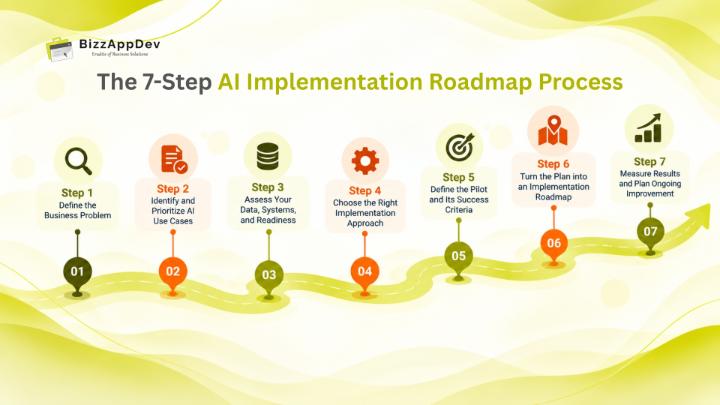
The 7-Step AI Implementation Roadmap Process
Step 1: Define the Business Problem
Start with the business problem, not the AI technology.
Identify where work is slow, repetitive, difficult to scale, or dependent on employees manually searching for information. Talk to the people who perform these tasks and the managers responsible for their outcomes.
For example, a business might discover that employees spend considerable time locating internal procedures, answering recurring operational questions, or moving information between disconnected systems.
Before selecting a solution, document:
- The current process and how it works.
- The people affected by the problem.
- The delays, errors, costs, or effort involved.
- The outcome the business wants to improve.
- The current method of measuring that outcome.
Establish a baseline wherever possible. If your goal is to reduce the time employees spend finding information, understand how that time is currently spent before introducing an AI assistant.
Output: A clearly defined business problem, its baseline, and the outcome the initiative is expected to improve.
Step 2: Identify and Prioritize AI Use Cases
Once the problem areas are clear, identify where AI could make a meaningful difference.
Potential use cases may include document processing, internal knowledge assistants, customer support assistance, demand forecasting, workflow automation, or AI integrated with an existing ERP system.
However, not every promising idea should become the first implementation project. Evaluate each opportunity against a consistent set of criteria.
Consider:
- Business value: How important is the problem, and what improvement would matter?
- Technical feasibility: Can the proposed solution be built and integrated reliably?
- Data readiness: Is the necessary information available, relevant, and sufficiently reliable?
- Risk and governance: What privacy, security, accuracy, or oversight requirements apply?
- Integration effort: How much work is required to connect the solution with existing systems?
- Time to evidence: How quickly can the team gather credible evidence of its value?
A use case with a clear business owner, accessible data, manageable dependencies, and measurable outcomes may be a better starting point than a more ambitious initiative with unresolved requirements. Evaluating opportunities against business needs, technical feasibility, and organizational readiness helps teams identify the right AI use cases for their business before committing to implementation.
Output: A prioritized list of AI opportunities with a documented reason for selecting each one.
Step 3: Assess Your Data, Systems, and Readiness
A promising use case can still fail if the underlying information or systems are not ready.
Before selecting an implementation approach, examine the environment in which the AI solution will operate. This includes data quality, application access, existing workflows, technical constraints, and the people who will use the solution.
Ask the following questions:
- Where does the required information currently reside?
- Is it accurate, current, and accessible to the intended users?
- Are important documents or records duplicated, outdated, or incomplete?
- Which business systems must the solution connect with?
- What permissions should determine which information a user can access?
- What happens when the AI produces an incomplete or incorrect answer?
- Who will maintain the information and resolve issues after deployment?
If AI needs to work with ERP data, for example, the team should understand the relevant business processes, system permissions, and integration requirements before deciding how the solution will be built.
Readiness is not simply a technical checklist. It also involves process ownership, user expectations, governance, and the organization's ability to support the solution. Understanding what AI implementation involves, from assessing requirements to deploying and improving a solution, helps teams account for these factors before moving forward.
Output: A readiness assessment covering data, systems, people, risks, and the dependencies that must be addressed.
Ready to Assess Your AI Readiness?
Identify gaps in your data, systems, and processes before committing to implementation.
Step 4: Choose the Right Implementation Approach
After prioritizing a use case and assessing readiness, determine how it should be implemented.
The right approach depends on the business problem, existing technology, data requirements, expected user experience, and level of control needed.
Possible approaches include:
- Using an existing AI tool: Suitable when a tool already supports the required task and meets business requirements.
- Integrating AI with existing applications: Useful when AI needs business context or must operate within an established workflow.
- Building a custom AI application: Appropriate when the use case requires specific capabilities, user experiences, integrations, or control over how the solution operates.
- Combining approaches: Some initiatives use an existing model or service within a custom application connected to business systems.
Not every initiative needs AI. Process redesign, better search, or conventional automation may solve some problems more simply, so choose the simplest approach that meets the requirement reliably.
For example, an internal knowledge assistant may need to retrieve approved documents, respect access permissions, and provide answers within an employee's existing workflow. Choosing a tool based only on its conversational capabilities would overlook these operational requirements.
Evaluate the options against the same criteria: functionality, integration effort, data handling, security, maintainability, and total cost of ownership.
Businesses using Odoo or other ERP platforms should consider how AI will interact with existing workflows, business records, and system integrations. This is particularly important when integrating AI and LLM capabilities into Odoo, where the implementation approach must account for both AI requirements and existing business processes.
Output: A documented implementation approach with a clear rationale, expected dependencies, and known constraints.
Step 5: Define the Pilot and Its Success Criteria
Before committing to a broad rollout, define how the proposed solution will be tested.
A pilot should answer a specific question: can this solution address the selected business problem under realistic conditions?
Set clear evaluation criteria before testing begins. Depending on the use case, these might include answer accuracy, task completion, processing time, error rates, user feedback, or the amount of manual correction required.
A practical pilot plan should specify:
- The users and workflows included in the test.
- The data and systems involved.
- Representative test cases, including difficult or unusual situations.
- The criteria for acceptable performance.
- The risks and failure scenarios to examine.
- The people responsible for reviewing results.
- The conditions for proceeding, revising, or stopping.
For an AI knowledge assistant, testing should go beyond a few straightforward questions. Include questions that require information from different sources, ambiguous requests, outdated documents, and situations in which the correct response is to acknowledge a limitation rather than provide an unsupported answer.
The team should also test access controls and confirm that the solution does not expose information to unauthorized users.
Output: A pilot plan with agreed evaluation criteria, test cases, responsibilities, and a decision process.
Step 6: Turn the Plan into an Implementation Roadmap
With the use case, requirements, and pilot approach defined, organize the work into phases. Each phase should have an owner, a tangible output, dependencies, and a decision point.
The following table illustrates a roadmap for an AI knowledge assistant. It is a general planning example, not a record of the planning process for a specific BizzAppDev project.
Roadmap phase | Key activities | Suggested owner | Example dependencies or deliverables | Decision gate |
Assess | Identify common employee questions, where answers reside, and how much time employees spend searching today. | Process owner | Current workflow, baseline measures, business requirements | Is the problem worth solving? |
Prioritize | Compare the opportunity with other candidates and decide whether it is suitable for an initial pilot. | Business and IT leads | Use-case assessment, expected value, feasibility review | Is this the right initiative to start with? |
Prepare | Review document quality, ERP permissions, knowledge sources, integration needs, and answer-reliability requirements. | IT and data owners | Data inventory, access requirements, integration scope, risk assessment | Are the critical gaps understood and addressed? |
Validate | Test representative questions against approved sources and assess relevance, accuracy, access controls, and the need for human correction. | Project team and pilot users | Test dataset, acceptance criteria, pilot feedback, issue log | Proceed, revise, defer, or stop? |
Deploy | Establish access controls, integration reliability, monitoring, support ownership, and user guidance. | IT and support owners | Production readiness checks, operating procedures, support plan | Is the solution ready for production use? |
Improve | Review feedback, unsuccessful queries, and performance; refine knowledge sources and workflows. | Business owner | Performance reviews, user feedback, prioritized improvements | Expand, refine, or retire the solution? |
These six planning phases expand the four-stage AI implementation lifecycle: Assess, Build, Deploy, and Improve. Assess and Prioritize define the business problem and select the right use case. Prepare and Validate cover the key activities needed to build and test the solution. Deploy and Improve focus on production use, monitoring, and ongoing refinement.
What to Record for Each Initiative
For each initiative, record the following details so the roadmap can guide actual delivery:
- Accountable owner: Who is responsible for the initiative and its decisions?
- Dependencies: Which data, systems, approvals, teams, or earlier tasks must be ready?
- Deliverables: What tangible output should each phase produce?
- Decision criteria: What evidence is required to proceed, revise, defer, or stop?
- Required resources: What skills, team capacity, budget, and infrastructure are needed?
- Review point: When will the team revisit assumptions, progress, risks, and results?
Output: A phased roadmap with clear accountability, dependencies, deliverables, resources, decision criteria, and review points.
How Long Does AI Implementation Take? Illustrative Phase Timelines
The time required depends on the use case, scope, data readiness, integration complexity, and production requirements. The following ranges are illustrative planning estimates for one focused use case, not guaranteed delivery times or verified BizzAppDev project benchmarks.
Phase | Duration | Expected output |
Assess | 1–3 weeks | Problem statement, baseline, and owner |
Prioritize | 1–2 weeks | Ranked use cases and prioritization rationale |
Prepare | 2–6 weeks | Readiness findings and implementation scope |
Validate | 4–8 weeks | Pilot evidence and a decision to proceed, revise, or stop |
Deploy | 2–8 weeks | Production-ready workflow, user training, and support arrangements |
Improve | Ongoing | Monitoring, feedback, and an improvement backlog |
These timelines are illustrative planning estimates, not guaranteed delivery times or industry benchmarks. Actual durations vary substantially by organization, data quality, security reviews, integration scope, available resources, and project complexity. Estimate timelines after assessing the requirements and dependencies, and revise them as the project progresses.
These phases can overlap, and their durations should not automatically be added together to estimate the total project timeline. Actual timing depends on data quality, integration complexity, security requirements, scope, available resources, and the level of human oversight required.
Step 7: Measure Results and Plan Ongoing Improvement
Deployment is not the end of the roadmap. Once the solution is in use, evaluate whether it is improving the business process it was designed to support.
Choose a small set of measures tied to the original objective rather than relying on usage statistics alone.
What to measure | Example indicator |
Business outcome | Time saved on the target task or reduction in manual processing |
Solution quality | Accuracy, successful task completion, or correction rate |
User experience | Feedback from intended users and recurring usability issues |
Operational reliability | Availability, failures, and support incidents |
Cost and effort | Ongoing operating costs and the resources required to maintain the solution |
Compare the results with the baseline established in Step 1. Review unexpected outcomes, identify gaps, and decide whether the initiative should be improved, expanded, or reconsidered.
A roadmap should evolve as evidence becomes available. New use cases can be added when the initial implementation demonstrates value and the organization has the capacity to support further work.
Output: A measurement and improvement plan with clear ownership and regular review points.
Case Example: Odoo AI Knowledge Assistant
BizzAppDev’s ERP AI Knowledge Assistant project describes an anonymised customer production deployment that brings organisational knowledge, onboarding information, and process guidance into an ERP workflow.
The solution combines conversational context, knowledge retrieval through file search and vector stores, and OpenAI Responses API processing informed by retrieved information. Response validation and citation handling help surface supporting context before a response reaches the user. These mechanisms do not automatically verify factual accuracy, so important answers and decisions should still be checked against the sources.
The six-phase roadmap in this article is an illustrative planning framework, not a claim about how this deployment was planned. The appropriate rollout, evaluation criteria, and technical approach will depend on each organisation’s requirements.
Common AI Implementation Roadmap Mistakes to Avoid
Even a well-structured roadmap can lose direction if the team overlooks practical implementation requirements.
1. Starting with technology instead of the business problem. Selecting an AI tool before understanding the need can lead to a solution that does not address the real issue.
2. Prioritizing too many use cases at once. Spreading resources across multiple initiatives can make it harder to validate results and establish clear ownership.
3. Underestimating data and integration work. Incomplete information, unclear permissions, and complex system dependencies can delay delivery or affect reliability.
4. Treating a pilot as the finished product. A promising pilot still needs appropriate production preparation, support, and monitoring.
5. Measuring activity instead of value. Usage counts alone do not show whether the original business problem has improved.
6. Leaving ownership unclear after deployment. Without a responsible owner, feedback, maintenance, and ongoing improvement can become inconsistent.
A roadmap helps address these risks by making assumptions, dependencies, responsibilities, and decision criteria explicit before the project moves too far forward.
AI Implementation Roadmap Checklist
Before approving an AI initiative, use this checklist to check whether the roadmap is ready to guide delivery.
- Business problem and intended outcome are clearly defined.
- A baseline exists for measuring improvement where practical.
- The use case has been compared with other opportunities.
- Data readiness, system dependencies, and access requirements have been assessed.
- The implementation approach has a documented rationale.
- Pilot scenarios and success criteria are agreed upon.
- Owners and decision gates are defined for each phase.
- Production support, monitoring, and governance requirements are understood.
- Resources, dependencies, deliverables, and review points are documented.
- Measures are in place for ongoing improvement.
If critical requirements remain unresolved, record them as dependencies rather than treating them as completed tasks.
Build an AI Roadmap Around Real Business Needs
An effective AI implementation roadmap connects business priorities with the practical work required to deliver a reliable solution. It helps teams decide what to implement first, identify dependencies early, test assumptions, assign ownership, and measure whether the result creates meaningful value.
The objective is not to implement the largest number of AI initiatives. It is to choose the right opportunities and build a realistic path from an identified business problem to a solution that people can use and the organization can support.
BizzAppDev helps businesses plan and implement AI solutions, including AI connected with existing business systems and Odoo workflows.
Ready to Put Your AI Roadmap into Action?
Turn your AI priorities into practical solutions with BizzAppDev.
FAQs
An AI implementation roadmap is a structured plan for moving AI initiatives from business problem identification through prioritization, preparation, validation, deployment, and improvement. It defines the required work, ownership, dependencies, decision points, and success measures.
An AI strategy sets the broader direction: why the business wants to use AI, which objectives it supports, and what principles guide investment. An AI implementation roadmap turns that direction into prioritized initiatives, delivery phases, responsibilities, dependencies, and measurable milestones.
It should include business objectives, prioritized use cases, data and system requirements, the implementation approach, resource needs, ownership, risk and governance requirements, decision gates, and measures of success. It should also explain how the solution will be supported and improved after deployment.
Start by defining a measurable business problem, then identify and prioritize potential use cases. Assess data and system readiness, select an appropriate implementation approach, define pilot criteria, map phases and responsibilities, and establish how results will be measured and improved.
The timeline depends on the number of initiatives, their scope, data readiness, integrations, and production requirements. A roadmap should distinguish the time needed to prepare and validate each initiative from the work required to deploy and support it. Estimate delivery dates after the main dependencies and resources are understood.
A focused pilot can be useful when important assumptions about feasibility, quality, or user needs still need to be tested. It should have realistic test cases and clear success criteria. Once the evidence supports proceeding, the team can prepare for production deployment. Some straightforward initiatives may not need a separate pilot, so the decision should reflect the use case and its risks.