
GST compliance is a critical part of financial operations for businesses dealing with indirect taxes. While regulations demand accuracy, consistency, and timely reporting, many organizations still rely on manual processes or disconnected tools. This often results in data mismatches, reconciliation issues, and unnecessary compliance risks.
Odoo GST compliance addresses these challenges by embedding GST rules directly into accounting workflows. With built-in fiscal localization, structured reporting, and validation mechanisms, Odoo helps businesses manage GST-related tasks more efficiently, provided the system is configured correctly and used as intended.
This article explains how Odoo supports GST compliance in practice, what it automates, where manual oversight is still required, and how businesses can use it as a reliable compliance framework rather than a black-box solution.
What Is Odoo GST Compliance and Why It Matters
GST compliance is not limited to filing returns. It involves correct tax determination, compliant invoicing, accurate classification of goods and services, and maintaining traceable accounting records.
Odoo functions as a GST-ready ERP system by offering a dedicated fiscal localization that aligns accounting structures, tax logic, and reporting formats with GST requirements. Instead of treating GST as an external activity handled at month-end, Odoo integrates compliance into everyday transactions.
For finance teams evaluating an ERP for GST filing, this integrated approach reduces dependency on spreadsheets and external reconciliation tools, while still allowing control and review at every stage.
GST Localization in Odoo: Built-In but Configuration-Driven
Odoo’s GST capabilities are delivered through dedicated fiscal localization modules designed to align accounting structures, tax logic, and reporting formats with regulatory requirements. These localization modules provide the accounting foundation, while e-invoicing and e-way bill workflows are enabled separately through API-based integrations with official government systems.
These modules provide:
- A pre-configured Chart of Accounts aligned with GST reporting
- Standard tax rules for CGST, SGST, and IGST
- Fiscal positions to manage different transaction scenarios
- Partner-level tax identification fields
However, it’s important to note that localization is not plug-and-play. Businesses must actively configure tax rates, fiscal positions, and product classifications to reflect their actual operations. When implemented correctly, Odoo serves as a strong accounting ERP for regulated tax environments.
Many organizations choose professional Odoo implementation support to ensure this setup matches both regulatory needs and internal workflows.
Automated GST Calculation in Odoo
Manual GST calculation is one of the most common sources of compliance errors. Applying the wrong tax type or rate can lead to incorrect invoices and return mismatches.
How Odoo Applies GST
With automated GST calculation in Odoo, tax determination is based on:
- The location of the buyer and seller
- The fiscal position applied to the transaction
- The HSN or SAC code linked to the product or service
Odoo automatically decides whether CGST/SGST or IGST should apply. This Odoo GST tax calculation logic reduces human error but still depends on correct configuration. If locations or fiscal positions are set incorrectly, the system will apply the wrong tax, highlighting the importance of initial setup and periodic review.
HSN and SAC Code Management for GST Accuracy
HSN and SAC codes are mandatory for GST reporting and play a key role in tax determination. Odoo allows businesses to assign these codes at the product level.
Once configured:
- HSN/SAC codes flow automatically into sales orders and invoices
- Tax calculations align with product classification
- GST reports become more accurate and easier to reconcile
This structured approach supports stronger GST reporting and reconciliation, especially during audits or regulatory reviews.
Odoo GST Invoice Format and Compliance Validation
GST-compliant invoices must include specific details such as tax breakup, product classification, and registered tax IDs. Odoo follows the standard Odoo GST invoice format, ensuring required fields are present before invoices are posted.
Built-in validation checks help identify:
- Missing or invalid tax IDs
- Incorrect tax application
- Incomplete invoice data
These validations do not replace human review, but they act as an early warning system that improves invoice quality and compliance consistency.
E-Invoicing and E-Way Bill Integration in Odoo
Odoo supports e-invoicing and e-way bill workflows through API-based integration with official government portals. This functionality requires prior portal registration, valid API credentials, and explicit enablement within Odoo before it can be used.
Once configured, Odoo can generate structured e-invoice and e-way bill data directly from posted invoices, transmit it via APIs, and store reference numbers and status responses within the system.
However, Odoo does not bypass regulatory requirements. Businesses remain responsible for portal registration, credential maintenance, and regulatory approvals. Odoo acts as a system of record and data transmission layer, ot as a substitute for statutory portals.
What Odoo Automates and What It Doesn’t
Once configured, e-way bill generation in Odoo reduces duplicate data entry and improves documentation consistency. This level of Odoo e-way bill automation is especially useful for businesses managing frequent goods movement. However, regulatory compliance, credential validity, and submission accountability always remain with the business.
GST Returns Filing in Odoo: Structured, Not Fully Automatic
Odoo simplifies GST returns by generating structured reports, but it does not independently file returns without user involvement.
Supported GST Reports
Odoo supports:
- Odoo GSTR-1 report for outward supplies
- Odoo GSTR-3B report for summary reporting
- Reconciliation-ready data aligned with purchase registers
These Odoo GST reports can be exported in JSON or CSV formats suitable for portal upload. Where API integrations are enabled, Odoo can assist in transmitting structured return data and tracking submission responses.
Final filing, confirmation, and legal responsibility always remain with authorized users. Odoo supports preparation and validation, not autonomous statutory filing.
Validation, Audit Trail, and MSME-Oriented Controls
Transparency is a key requirement for GST compliance. Odoo maintains a detailed audit trail covering:
- Invoice creation and modification
- Tax changes
- GST report generation
Validation rules flag inconsistencies such as incorrect tax application or missing partner data. These controls make Odoo a practical digital tax compliance solution, especially for businesses subject to regular audits.
Odoo includes payment term tracking, vendor aging reports, and partner tagging that can support MSME-related monitoring when combined with internal controls. While Odoo provides visibility and reporting, statutory MSME compliance depends on business policies and review processes rather than automatic enforcement by the software.
For businesses with complex structures, Odoo customization services can help adapt audit and validation workflows to internal control policies.
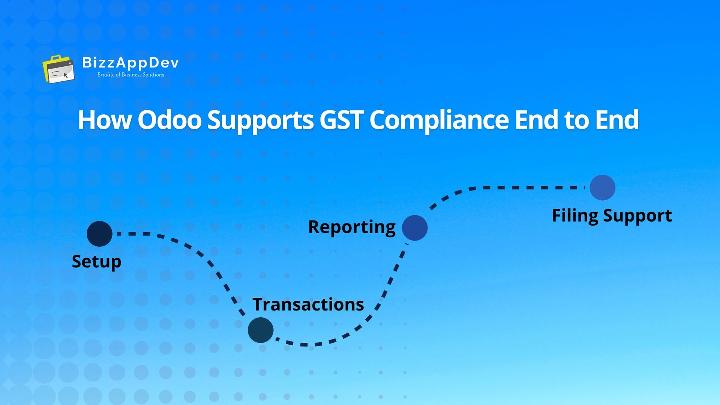
How Odoo Supports GST Compliance End to End
Odoo’s GST workflow follows a clear sequence:
- Setup – Install localization, configure taxes, fiscal positions, and HSN codes
- Transactions – Apply automated tax logic during sales and purchases
- Reporting – Generate GST reports from accounting data
- Filing Support – Validate data and prepare returns for submission
This approach demonstrates how Odoo helps embed compliance into daily operations rather than treating it as a separate, end-of-month task.
Best Practices for Using Odoo for GST Compliance
To maintain reliable compliance, businesses should follow these practices:
- Regularly review tax configurations and fiscal positions
- Keep HSN/SAC codes updated across products
- Validate partner tax IDs and locations
- Reconcile GST data before return submission
- Periodically review audit trails and validation warnings
GST compliance in Odoo works best when technology is supported by disciplined processes and informed users.
Final Thoughts
GST compliance is not about eliminating human involvement, it’s about reducing avoidable errors and building repeatable, auditable processes.
Odoo GST compliance offers a strong foundation by integrating tax rules, validation, reporting, and audit trails into a single ERP system. When configured correctly and supported by the right processes, Odoo helps businesses manage compliance with clarity, control, and confidence, without overstating automation where regulatory oversight is still required.
This balanced approach is what makes Odoo a practical long-term solution for GST compliance rather than just another accounting tool.
Simplify GST compliance without losing control, see how Odoo automates what matters and keeps you audit-ready.
Talk to our experts today.
FAQs
Yes. When properly configured, Odoo functions as a GST automation software that supports tax calculation, invoicing, reporting, and compliance checks.
Odoo facilitates return preparation and structured data transmission, but final filing requires user review and authorization.
Yes. Odoo scales well and is commonly used as an ERP for GST filing by growing organizations.
Odoo provides structured data and reporting that support the GST reconciliation process, but reconciliation accuracy depends on proper configuration and data discipline.